| guthrie CAD2Shape |
 |
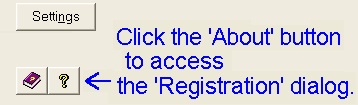
To enable the fully licensed version of the software, start CAD2Shape, and then click on the software's 'About' button. In the 'About' dialog click the 'Registration' button.
 |
Enter your Name and Keycode exactly as supplied to you when you purchased the software.
Keycode / registration problems
'Registration details incorrect' message
If you get a 'Registration details incorrect' error message when attempting to register the software, check:
- have you entered both the License Name and Keycode exactly as supplied?
- are you trying to enter the Serial Number instead of the Keycode?
- is the software the same major version number as the Keycode was issued for?
e.g. A keycode issued for v 6.0 of the software will not work with v. 7.0, and vice versa. You need to do one of the following:
(1) download the correct version.
download the latest software  here
here
download previous versions here
(2) if you have lost your keycode information, send a request to our software support to get your keycode resent to you.
(3) if you are eligible for a free upgrade to the latest major software (registered users are eligible for free upgrades for 12 months from the date of purchase) but have not received a new keycode, send a request to our software support to get your new keycode.
(4) Purchase an upgrade to the latest software
Software reverts to Trial Mode
If the software successfully registers, but reverts to trial mode the next time the software is started, re-run the software 'as administrator' and then re-register the software. E.g. in Vista right click on the HPGL2CAD deskop icon, and select 'Run as Administrator.'
Getting the latest software version
We are updating the software on a regular basis. All updates are free to registered users who purchased the software within the last 12 months. Simply go the download page and download the latest software. (If there has been a major upgrade since your last download you may also need to request a new keycode.) If you have discovered a software error, it is always recommended to download the latest version of the software prior to reporting the bug, since chances are it has already been fixed.
Download the latest release CAD2Shape here!
Upgrade to the latest CAD2Shape here!
The complete CAD2Shape user manual is included in the download software. Open the Help file via Start > All Programs > CAD2Shape
> CAD2Shape User Guide.
A PDF version of the CAD2Shape user manual is also available. It may be downloaded here: Right click to download.
Known problem running Help file on a network drive
If the software is installed on a network drive the online help may not be accessible. The online help contents may be visible in the left hand panel, but the right hand panel may display a message such as 'Action cancelled' or 'Internet Explorer was unable to link to the web page you requested.'
2 possible solutions are:
(1) Install CAD2Shape on your local drive.
(2) Download and run 'HHReg v1.1 - HTML Help registration utility' and add cad2shape.chm to the list of .CHM files explicitly allowed to run from a network drive.
Archived Software versions
Archived versions of CAD2Shape are available here.
Reporting a Software Error
Please send as much detail as possible about the problem being experienced.
- include the exact version of the software as displayed in the CAD2Shape 'About' dialog. (It is also recommended to download the latest software prior to reporting a bug, see above.)
- write down as much detail as possible about the error, and the steps to repeat it.
- if a bug is demonstrated by, or only occurs with a particular CAD file, it should be sent if at all possible (please ZIP.)
- send stored defaults (.DEF) file.
CAD2Shape stores the settings that were used in each translation. These settings are stored in individual files in the 'DEFS' folder, which is a sub-folder of the CAD2Shape installation folder. Because a problem may only be related to a specific setting it is useful to send this file so that we can see the exact settings used for the translation.
Technical support may be obtained by sending an email to our 'Technical Support' email. See here.
Technical support is available to both registered and unregistered users of CAD2Shape.
Q. Can CAD2Shape handle large, say 50MB+ files?
A. Yes, CAD2Shape has no theoretical problem with large CAD files. The available physical memory will usually be the only limiting factor. As a rough guide if your CAD software can read the CAD file, then CAD2Shape will also be able to translate it.
(Note also that the trial version of the software is limited to a
maximum file size of 10MB but this is not the case with the full
version.)
Q. The translation seemed to
go ok, and a .shp + .shx + .dbf files were produced, but Arcview
does not see them.
A. The version of Arcview that you are using is not
able to read 3D shapefiles. Turn off the '3D' flag in
CAD2Shape.